Best Coding Robots for Elementary Schoolers in 2025: Top 5 Picks for Ages 5–10
Walk into almost any elementary classroom today, and you’ll spot a little robot zipping across the floor while a group of 7-year-olds cheer it on. That’s not an accident — coding robots have become one of the most powerful tools for teaching kids logical thinking, problem-solving, and persistence, all wrapped up in something that looks a whole lot like play. These robots are more than toys — they’re powerful learning tools that introduce children to logic, creativity, and problem-solving.
The tricky part? Knowing which robot is right for your kid. A bot that’s too simple gets shelved in a week; one that’s too advanced ends in tears. The good news: there are some genuinely excellent options on the market right now that hit the sweet spot for elementary schoolers. Individual development matters more than rigid age guidelines — a mechanically-minded 7-year-old might excel with advanced robots while some 10-year-olds prefer simpler options. Match complexity to genuine interest and frustration tolerance rather than chronological age. We’ve done the research so you don’t have to.
Quick Picks
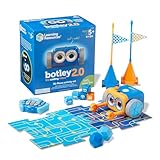 Learning Resources Botley The Coding Robot 2.0 Activity Set - 78 Pieces — $59.99
The ultimate screen-free starter robot that teaches real coding logic through hands-on obstacle courses and 78 pieces of coding fun.
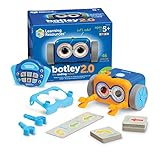 Learning Resources Botley The Coding Robot 2.0 - Robot Toy Gift Set — $44.99
A budget-friendly, no-screen coding robot perfect for kindergarteners and early elementary kids diving into sequencing for the first time.
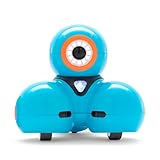 Wonder Workshop Dash Robot - Coding Robots for Kids 6+ — $129.99
A personality-packed, voice-activated robot with five free STEM apps that grows from block coding all the way to advanced programming challenges.
 Wonder Workshop Dash Robot & Gripper Kit Bundle — $149.99
Everything in the classic Dash Robot plus a Gripper Kit add-on that lets kids engineer real-world robotics challenges right at home.
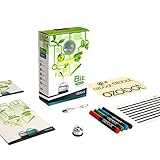 Ozobot Bit Coding Robot — $59.99
A pocket-sized powerhouse that starts with color-coded marker drawing and levels up to full block-based programming — zero frustration, maximum wow.
| Robot | Best For | Ages | Skill Level |
|---|---|---|---|
| Botley 2.0 Activity Set | Screen-free beginners | 5–8 | Starter |
| Botley 2.0 Gift Set | Budget-conscious families | 5–7 | Starter |
| Wonder Workshop Dash | Growing coders | 6–10 | Beginner–Intermediate |
| Dash + Gripper Bundle | Hands-on engineers | 6–10 | Intermediate |
| Ozobot Bit | Creative art-meets-code kids | 6–9 | Beginner–Intermediate |
The Best Coding Robots for Elementary Kids, Reviewed
🤖 Best Screen-Free Starter: Learning Resources Botley 2.0 Activity Set
If your child has never touched a coding robot before, Botley 2.0 is the place to start — and the 78-piece Activity Set is the version that gives you the most to work with right out of the box.
Botley 2.0 is a favorite in early elementary classrooms because it teaches coding without screens. Children ages 6–10 program it using directional buttons and 40 coding cards. It’s hands-on, active, and perfect for kids who learn by moving and building.
Here’s what makes Botley 2.0 so special for young learners:
-
Zero screens required. Coding helps kids learn coding and STEM skills without a tablet or phone.
-
Advanced features that grow with your child. Advanced programming features like object detection, light and sound sequences, 45-degree turns, and 150-step programming capabilities provide progressive learning opportunities for multiple skill levels.
-
Real coding concepts, disguised as play. Botley also comes with a “Coding Challenges” booklet that they can work through to practice real coding concepts like loops and conditionals.
-
Durability built in. Key features include durability with a sturdy plastic build that withstands drops, and over 70 pieces for creative setups.
The Activity Set version is the one to grab if you want the full experience: tiles, obstacles, coding cards, and boards to build themed challenge worlds. This open-ended robotics kit invites children to think like engineers and storytellers. Using the included boards and obstacles, they can create city streets, space missions, or treasure hunts, then program Botley 2.0 to navigate twists, turns, and surprises.
💰 Best Budget Pick: Learning Resources Botley 2.0 Gift Set
Same great Botley robot, smaller footprint on your wallet. The Gift Set version is the streamlined option for families who want to introduce coding concepts without going all-in on accessories immediately.
Botley 2.0 introduces kids ages 5 and up to the world of coding through interactive, screen-free play. This smart robot offers multiple ways to learn, from simple sequences to advanced challenges, helping children develop problem-solving and STEM skills. With features like obstacle detection, black-line following, and light-up effects, Botley keeps learning exciting and dynamic.
Key highlights of this version:
-
Ready to code fast. Get Botley ready to code right out of the box with 40 different coding cards to get him on the move.
-
Screen-free from day one. Botley 2.0 features completely screen-free coding with no phone or tablet required.
-
Fun character unlocks. Kids can even unlock hidden modes and transform Botley into fun characters for imaginative play.
-
Obstacle detection sensor. The obstacle detection sensor prevents Botley from driving off tables or into walls — a detail parents will genuinely appreciate.
This is a fantastic first gift for kindergarten through 2nd grade. You can always add the full Activity Set accessories later as an upgrade. For ages 5–8, the Learning Resources Botley is the top screen-free pick.
🌟 Best Overall: Wonder Workshop Dash Robot
If you can only buy one coding robot, make it Dash. This friendly blue robot has been used in over 40,000 schools, and it’s easy to see why — it combines genuine personality with a coding system that grows from simple dragging-and-dropping all the way to sophisticated challenges.
The Dash Robot remains effective with helping students develop beginner computer science skills. Coding with the Dash helps elementary school students obtain experience with programming fundamentals.
What sets Dash apart:
-
Five free apps for every stage. The Dash robots for children respond to voice commands or any of our five free downloadable apps to sing, draw, and move around. The app-controlled robot can be used with the five free apps for Apple iOS, Android OS, and Fire OS — including Blockly Dash & Dot Robots, Wonder for Dash And Dot Robots, and Path for Dash Robots.
-
A robot with real personality. The Dash Robot can take on different personalities, which students can choose to deploy using the apps. No matter what, Dash wakes up with a signature phrase, “Howdy-doo!” It also communicates with students directly, responding to voice or sound — and making playful comments.
-
Blockly coding that mirrors Scratch. Dash Blockly introduces young coders to a block-based coding interface and allows kids to drag and drop coding blocks to create code to control their robot. The coding interface itself is super similar to other block-based codes, such as MIT’s Scratch interface.
-
Snap-on accessory ecosystem. Dash provides a highly interactive coding experience, even allowing students to add various snap-on accessories, like their Launcher, Xylophone, or Sketch Kit. With the Launcher, they can learn about physics and engineering. Or, kids can attach markers to the Dash with the Sketch Kit and direct it to draw or write, incorporating art and communication concepts into STEAM learning.
Wonder Workshop Dash has proven itself in 40,000+ schools — that kind of track record speaks for itself.
🔧 Best for Hands-On Engineers: Wonder Workshop Dash + Gripper Kit Bundle
Love everything about Dash but want more? The Dash + Gripper Kit Bundle takes the classic robot and adds a mechanical grabber attachment that opens up a whole new world of engineering challenges — think robotics arm missions, object delivery tasks, and creative builds that kids design themselves.
Give your child a STEM advantage with Dash, the friendly learning robot that makes learning to code fun and engaging. Our kids coding toys help them gain confidence as digital citizens and architects by seeing their designs come to life.
Why the bundle is worth it:
- Everything Dash does, plus physical interaction. Kids don’t just program movement — they program gripping, picking up, and delivering objects, which introduces mechanical thinking alongside coding.
- Grows the complexity ceiling. Adding a physical attachment means kids have to account for real-world variables (weight, distance, grip timing), teaching them the kind of systems thinking that real engineers use every day.
- Same five free apps included. All the great Dash programming tools come standard, so there’s no extra app cost.
- Perfect for 2nd grade and up. For ages 7–9, app-based robots that introduce visual block coding work well. The Sphero Mini, Dash Robot, and mBot all have good beginner apps. Kids this age can handle short assembly projects with adult help.
If your child has already tried the basics of coding and is hungry for more, the Dash + Gripper Bundle is the logical (and thrilling) next step.
🎨 Best for Creative Kids: Ozobot Bit Coding Robot
Ozobot Bit is a genius little robot about the size of a ping-pong ball that proves you don’t need a big robot to make a big impression. It’s ideal for kids who love art as much as tech — because the first way you program it is literally by drawing lines on paper.
With Bit, you’ll start coding with the stroke of a marker. Draw lines and Color Codes, and Bit follows each colorful command. Discover over 20 Color Codes as you complete your Bit Activity Pack.
Then things get more sophisticated:
-
Screen-free start, app-powered finish. Advance with the OzoBlockly code editor on a computer or tablet. Drag and drop blocks to create programs for Bit, then load your code just by holding Bit up to your screen.
-
Creative coding that merges art and logic. Ozobots’ two ways to code make our robots the perfect companions for future artists, engineers, and entrepreneurs. Color Codes offer the only way to start coding screen-free for kids as young as 6. From there, OzoBlockly visual programming language challenges and engages kids as they build career-boosting skills.
-
Great for classrooms and science clubs. Teachers already use four or more Ozobots to teach coding in Science Clubs. It’s a proven classroom hit.
-
Pocket-sized and durable. These little robots are no bigger than a ping-pong ball, but they are wonderful tools to teach coding to both kids and adults.
Buying Guide: What to Know Before You Buy
❓ What age should my child be before getting a coding robot?
Children can begin exploring coding concepts as early as age 2–3, when they start to understand cause and effect. Around age 5–7, screen-free coding toys help develop sequencing skills. From age 8+, kids can move into app-based coding robots for structured programming. For elementary school specifically, any child aged 5 and up is a great candidate for a starter robot like Botley 2.0.
❓ Do my kids need to know anything about coding to start?
Absolutely not. Coding isn’t as complex as it seems, especially when you start with the right tools. A robot kit and other educational tools provide a hands-on learning experience, making coding accessible and enjoyable for kids. All five robots on this list are designed for true beginners.
❓ Screen-free vs. app-based — which is better?
It depends on your goals and your child’s age. With concerns about too much technology in early education, many early education instructors are hesitant about introducing students to coding too soon. While this concern is reasonable, many early education coding tools — like screen-free options — offer screen-free learning that still prepares kids to use more traditional coding interfaces down the road. Younger kids (ages 5–7) generally thrive with screen-free robots. Older elementary kids (ages 7–10) are ready for app-based block coding.
❓ Will my child actually stick with it, or will the robot collect dust?
After spending significant time with coding robots, the clearest advice is this: match the robot to the child’s current level, not the level you hope they’ll reach. The best coding robots for kids are the ones that get used repeatedly — and that only happens when the challenge is right-sized from day one.
❓ Are these robots worth the money compared to coding apps?
Yes — in a meaningful way. Quality coding robots don’t teach Python syntax or JavaScript functions — they develop computational thinking that transfers to any programming language later. The kid learning “if sensor detects obstacle then turn right” grasps conditional logic whether it’s visual blocks on a robot or text code in an IDE. Physical robots also build focus, spatial reasoning, and hands-on problem-solving that a screen-only app simply can’t replicate.
All links in this post are affiliate links. As an Amazon Associate, Family Game Lab earns from qualifying purchases at no additional cost to you. Prices may vary.